AboutBox Method
Opens an About window.
Syntax
object.AboutBox()
Return Value
No return value.
|
DecodeFile Method
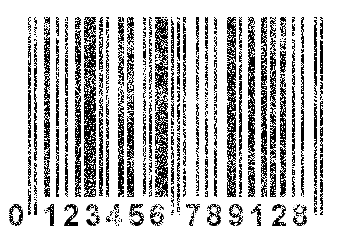
Decodes barcodes in the specified image file.
Syntax
object.DecodeFile(FileName)
Parameters
| FileName | A string defining the file name. |
Return Value
Integer. Returns the number of decoded barcodes.
Example
[Script]
var dec = new ActiveXObject("BarcodeReader.BarcodeDecoder");
var objBarcode;
dec.DecodeFile("c:\\barcodes.jpg");
for (var i=0; i < dec.Barcodes.length; i++)
{
objBarcode = dec.Barcodes.item(i);
alert(objBarcode.Text);
}
[Visual Basic]
Dim dec As Object
Set dec = CreateObject("BarcodeReader.BarcodeDecoder")
dec.DecodeFile ("c:\barcodes.jpg")
For i = 0 To dec.Barcodes.length - 1
Dim bc As Barcode
Set bc = dec.Barcodes.Item(i)
MsgBox bc.Text
Next i
Set dec = Nothing
[C/C++]
//creates the barcode decoder object
CComPtr<IBarcodeDecoder> pIBarcodeDecoder;
HRESULT hr = pIBarcodeDecoder.CoCreateInstance(
_T("BarcodeReader.BarcodeDecoder") );
_ASSERTE( SUCCEEDED(hr) );
hr = pIBarcodeDecoder->DecodeFile( _bstr_t("c:\\barcodes.jpg") );
_ASSERTE( SUCCEEDED(hr) );
|
DecodeFileRect Method
Similar to the DecodeFile method, but searches only a certain part of the image defined by the parameters x, y, width, height.
Syntax
object.DecodeFileRect(FileName, x, y, width, height)
Parameters
| FileName | A string defining the file name. |
| x | An integer value that defines the X coordinate of scanning zone. |
| y | An integer value that defines the Y coordinate of scanning zone. |
| width | An integer that defines the width of scanning zone. |
| height | An integer that defines the height scanning zone. |
Return Value
Integer. Returns the number of decoded barcodes.
|
DecodeStream Method
Similar to the DecodeFile method, but a file in the form of a data stream is passed as a parameter.
Everything that is contained in the image file is passed as a data stream.
Syntax
object.DecodeStream(FileStream)
Parameters
| FileStream | A Variant that contains a safe array of Bytes. |
Return Value
Integer. Returns the number of decoded barcodes.
Remarks
This method is convenient when there is no need to save the barcode image to a file, for instance, while decoding barcodes from some video capture device.
|
DecodeStreamRect Method
Similar to the DecodeStream method, but searches only a certain part of the image defined by the parameters x, y, width, height.
Syntax
object.DecodeStreamRect(FileStream, x, y, width, height)
Parameters
| FileStream | A Variant that contains a safe array of Bytes. |
| x | An integer value that defines the X coordinate of scanning zone. |
| y | An integer value that defines the Y coordinate of scanning zone. |
| width | An integer that defines the width of scanning zone. |
| height | An integer that defines the height scanning zone. |
Return Value
Integer. Returns the number of decoded barcodes.
|
DecodeGrayMap Method
This method finds barcodes in a raw gray map. It is the fastest method as compared to the other methods because no additional image transformations are performed in this case.
Syntax
object.DecodeGrayMap(GrayMap, GrayMapWidth, GrayMapHeight)
Parameters
| GrayMap | A Variant that contains a safe array of Bytes. |
| GrayMapWidth | Gray map width. |
| GrayMapHeight | Gray map height. |
Return Value
Integer. Returns the number of decoded barcodes.
Remarks
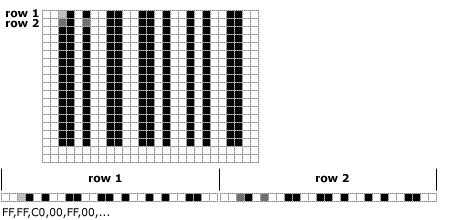
A gray map is a byte matrix. Each byte has the value from 0 to 255 and represents one image pixel.
0 means a black pixel, 255 means a white pixel.
The matrix is passed to the DecodeGrayMap method as a one-dimensional array. The first upper line of the image is sent first, then comes the second line and so on.
See the picture below for explanation.
Example
[C/C++]
const BYTE pgm[6300] = {
0xff,0xff,0xff,0xff,0xff,0xff,0x0,0x0,0x0,0x0, //...
};
//creates the barcode decoder object
CComPtr<IBarcodeDecoder> pIBarcodeDecoder;
HRESULT hr = pIBarcodeDecoder.CoCreateInstance(
_T("BarcodeReader.BarcodeDecoder") );
_ASSERTE( SUCCEEDED(hr) );
//creates the safe array
CComVariant var;
var.vt = VT_ARRAY | VT_UI1;
var.parray = SafeArrayCreateVector( VT_UI1, 0, sizeof(pgm) );
_ASSERTE( var.parray );
//locks the safe array
BYTE* pSaBuf=NULL;
if( SUCCEEDED(SafeArrayAccessData(var.parray, (void HUGEP**)&pSaBuf)) )
{
//copy the image into the safe array
memcpy( pSaBuf, pgm, sizeof(pgm) );
//unlock safe array
SafeArrayUnaccessData( var.parray );
}
hr = pIBarcodeDecoder->DecodeGrayMap( var, 105, 60 );
|
DecodeGrayMapRect Method
Similar to the DecodeGrayMap method, but searches only a certain part of the image defined by the parameters x, y, width, height.
Syntax
object.DecodeGrayMapRect(GrayMap, GrayMapWidth, GrayMapHeight,
x, y, width, height)
Parameters
| GrayMap | A Variant that contains a safe array of Bytes. |
| GrayMapWidth | Gray map width. |
| GrayMapHeight | Gray map height. |
| x | An integer value that defines the X coordinate of scanning zone. |
| y | An integer value that defines the Y coordinate of scanning zone. |
| width | An integer that defines the width of scanning zone. |
| height | An integer that defines the height scanning zone. |
Return Value
Integer. Returns the number of decoded barcodes.
|
SetProperty Method
It sets additional Barcode Decoder object properties. The input parameter PropertyValue is VARIANT, it can take data of various types depending on the PropertyName parameter.
Syntax
object.SetProperty(PropertyName, PropertyValue)
Parameters
| PropertyName | String that defines the property name. |
| PropertyValue | Variant that contains the property value. |
| PropertyName | Description |
| LinearInterl25MinLen | the minimum length of an Interleaved 2/5 barcode. If the length of a read barcode is less than this value, the barcode is considered unrecognized. Default value - 2 |
| LinearInterl25MaxLen | the maximum length of an Interleaved 2/5 barcode. If the length of a read barcode is greater than this value, the barcode is considered unrecognized. Default value - 50 |
| LinearIndustr25MinLen | same as LinearInterl25MinLen only for Industrial 2/5 barcode Default value - 1 |
| LinearIndustr25MaxLen | same as LinearInterl25MaxLen only for Industrial 2/5 barcode Default value - 50 |
| LinearCode11MinLen | Default value - 1 |
| LinearCode11MaxLen | Default value - 50 |
| LinearCode39MinLen | Default value - 1 |
| LinearCode39MaxLen | Default value - 50 |
| LinearCode128MinLen | Default value - 1 |
| LinearCode128MaxLen | Default value - 70 |
| LinearCodabarMinLen | Default value - 1 |
| LinearCodabarMaxLen | Default value - 50 |
| LinearFindErrorBarcodes | search for linear barcodes that have not been recognized for some reason. For example, corrupted, partially closed, etc. Example here. Default value - false |
| LinearBarcodesPerPage | how many linear barcodes to search for on each page. By default, this value is 0, i.e. search for all barcodes on each page. If the number of found barcodes equals to LinearFindBarcodes, the search is stopped. Default value - 0 |
| LinearFastDecoding | quick Linear barcode reading. It may be used on real-time barcode reading devices (mobile devices), where it is impossible to spend much time on recognition of poor-quality images. It is not recommended to set this property for image recognition on non-mobile devices. Default value - false (robust barcode reading). |
| PDF417BarcodesPerPage | how many PDF417 barcodes to search for on each page. By default, this value is 0, i.e. search for all barcodes on each page. Default value - 0 |
| PDF417FindBarcodes | how many PDF417 barcodes to search for in the entire document. Default value - 1 |
| PDF417FastDecoding | same as LinearFastDecoding only for PDF417. |
| DataMatrixBarcodesPerPage | how many DataMatrix barcodes to search for on each page. By default, this value is 0, i.e. search for all barcodes on each page. Default value - 0 |
| DataMatrixFindBarcodes | how many DataMatrix barcodes to search for in the entire document. Default value - 1 |
| DataMatrixFastDecoding | same as LinearFastDecoding only for DataMatrix. |
| DecodePageNumber | the number of the page to be recognized. This property works only for multipage files, e.g. TIFF, PDF. If this page does not exist in the file, an error will be returned during the decoding process. Default value - 0 (decode all pages). |
Return Value
No return value.
Example
[Visual Basic]
Dim dec As Object
Set dec = CreateObject("BarcodeReader.BarcodeDecoder")
dec.BarcodeTypes = dec.BarcodeTypes Or &H20000000 'add PDF417
Call dec.SetProperty("PDF417FindBarcodes", 3)
dec.DecodeFile ("c:\pdf417.bmp")
For i = 0 To dec.Barcodes.length - 1
Dim bc As Barcode
Set bc = dec.Barcodes.Item(i)
MsgBox bc.Text
Next i
Set dec = Nothing
|
GetProperty Method
Returns the properties set with the SetProperty method.
Syntax
object.GetProperty(PropertyName)
Parameters
| PropertyName | String that defines the property name. |
Return Value
Variant. Returns the property value.
|
GetSDKInfo Method
Returns various SDK information.
Syntax
object.GetSDKInfo(Version, Edition, Symbology, buildDate, LicenseInfo, expDate)
Parameters
| Version | Returns String that defines SDK version. "5.02" for example. |
| Edition | Returns Integer that defines SDK edition. 1 - Standard Edition, 2 - Professional Edition. |
| Symbology | Returns Integer that defines what barcodes types can decode this instance of SDK.
1 - Linear Barcode
2 - PDF417
4 - DataMatrix
Symbology value can combine different barcode types. For example: 3 - means Linear+PDF417, 1 - only Linear.
|
| buildDate | Returns DATE (double) that defines SDK building date. |
| LicenseInfo | Returns String that defines the license owner. If this value is null or empty then SDK works in demo mode. |
| expDate | expDate returns the DATE (double value) on which the subscription will expire. All SDKs released before this
date (whose buildDate is less than the expDate) will work without any limitations. Newer versions released after
the expDate will work only in demo mode.
If expDate is -1 then subscription expired.
|
Return Value
No return value.
|
|
|
 |
 |
 |
 |
Barcode Recognition SDK
version 5.06
Latest release: June 21 2010
What's new in SDK
Platforms:
Windows 32-bit & 64-bit, Windows Mobile Symbian (S60)
Supports
Linear:
Interleaved 2/5, Industrial 2/5, Code 39, Code 39 Extended, Codabar, Code 11, Code 128, Code 128 Extended,
EAN/UCC 128, UPC-E, UPC-A, EAN-8, EAN-13, Code 93, Code 93 Extended
2D:
PDF417
DataMatrix
Download
|
 |
 |
 |
 |
|
|